Opties voor tags
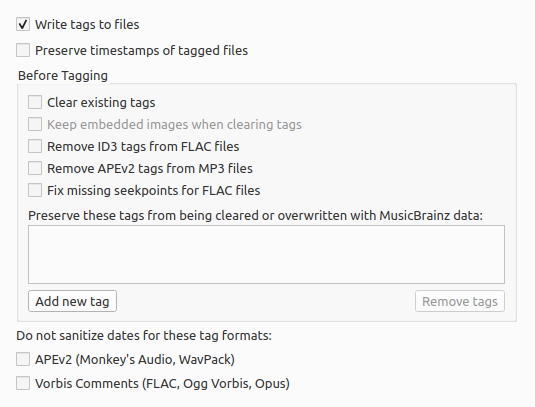
Tags naar bestanden schrijven
Vink dit uit om het schrijven van metadata naar je bestanden uit te schakelen. Picard kan je bestanden dan nog wel aan de hand van je instellingen verplaatsen en hernoemen.
De tijdstempel van getagde bestanden behouden
Als dit is aangevinkt, worden de datum en het tijdstip van de ‘laatste wijziging’ van je muziekbestanden niet bijgewerkt wanneer je nieuwe tags in de bestanden opslaat.
Clear existing tags
Checking this will remove all existing metadata and leave your files with only MusicBrainz metadata. Information you may have added through another media player such as “genre”, “comments” or “ratings” will be removed.
Keep embedded images when clearing tags
The default is for Picard to remove any embedded images from the files when clearing existing tags. Checking this option will keep the embedded images in the files.
Remove ID3 tags from FLAC files
Check to remove ID3 tags from FLAC files - Vorbis Comments are recommended for FLAC files. Picard will write Vorbis Comments to FLAC files regardless of this setting.
Remove APEv2 tags from MP3 files
Check to remove APEv2 tags from MP3 files - ID3 is recommended for MP3 files. Picard will write ID3 tags to MP3 files regardless of this setting.
Fix missing seekpoints for FLAC files
Some software has issues handling FLAC files that have an empty seek table metadata block. When this option is enabled empty and hence unused seek table blocks will be removed from the files on saving.
Preserve these tags from being cleared or overwritten with MusicBrainz data
This is an advanced option: If you have tags which you need to preserve, enter their names here to stop Picard from overwriting them.
Do not sanitize dates for these tag formats
Normally Picard will sanitize the dates stored in tags. This option allows you to override that sanitization for the selected formats.
Zie ook
Details: ID3-tags / AAC-bestanden / AC3-bestanden / WAVE-bestanden