Opties voor metadata
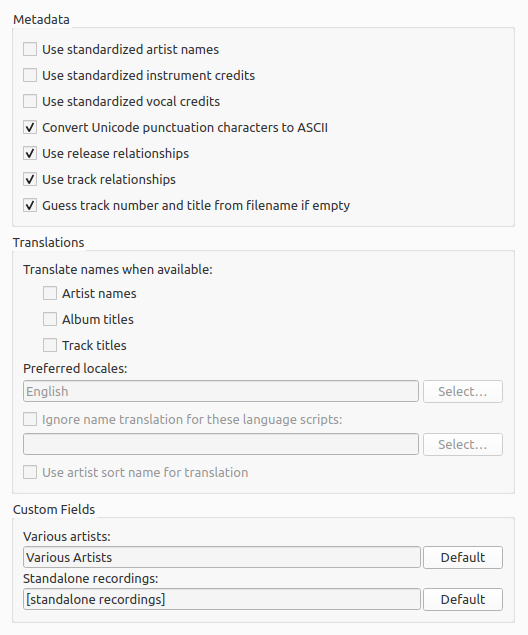
Gestandaardiseerde artiestennamen gebruiken
Vink dit aan om gestandaardiseerde artiestennamen te gebruiken in plaats van de artiestvermeldingen, die per uitgave of nummer kunnen verschillen.
Notitie
If “Artist names” under the “Translate names when available” option is also checked, it will override this option if a suitable alias is found.
Use standardized instrument credits
Check to only use standard names for instruments in performer relationships. Uncheck to use the instruments as credited in the relationship.
Use standardized vocal credits
Check to only use standard names for vocals in performer relationships. Uncheck to use the vocals as credited in the relationship.
Unicodetekens naar ASCII omzetten
Vink dit aan om unicodetekens in MusicBrainz-gegevens naar ASCII om te zetten, zodat interpunctie consequent wordt toegepast. Rechter enkele aanhalingstekens (’) worden dan bijvoorbeeld omgezet naar ASCII-apostrofs (’) en beletseltekens (…) naar drie punten (…).
Uitgaverelaties gebruiken
Vink dit aan om relaties op uitgaveniveau op te halen en naar tags te schrijven (bijv. URL’s, componisten, tekstschrijvers, uitvoerende artiesten, dirigenten of dj-mixers). Je moet dit aanvinken als je wil dat Picard hoesafbeeldingen downloadt.
Nummerrelaties gebruiken
Vink dit aan om relaties op opnameniveau (bijv. componist, tekstschrijver, uitvoerend artiest of remixer) naar tags te schrijven.
Nummerpositie en titel (als die onbekend zijn) aan de hand van de bestandsnaam gokken
Als dit is aangevinkt, probeert Picard de positie en titel van het nummer aan de hand van de bestandsnaam te gokken (als de tag
tracknumberoftitleleeg is).
Translate names when available
Picard can be set to provide translations of some items based on the available information in the MusicBrainz database. The items that can be translated are:
Artist names
Album titles
Track titles
When checked, Picard will check each of the selected locales in order to see whether an item has an alias for that locale. If it does, Picard will use that alias instead of the item name when tagging. For example, if you have selected locales of “English (Canadian)” and “English (US)”, and there are aliases for “English (US)”, “English” and “Greek”, then the “English (US)” alias will be used.
Picard zal eerst proberen om de eerste exacte overeenkomst te gebruiken. Als je bijvoorbeeld de talen ‘Engels (Canada)’, ‘Engels (VS)’ en ‘Grieks’ hebt geselecteerd en er aliassen voor ‘Engels’ en ‘Grieks’ zijn, wordt de Griekse alias gebruikt.
Als er geen exacte overeenkomsten zijn, probeert Picard een alias voor de bovenliggende taal te vinden. Als je bijvoorbeeld de talen ‘Engels (Canada)’, ‘Engels (VS)’ en ‘Grieks (Cyprus)’ hebt geselecteerd en er aliassen voor ‘Engels (VK)’ en ‘Grieks’ zijn, wordt de alias ‘Engels (VK)’ gebruikt.
If there is no match for the selected locale for an artist and “English” is the selected locale, Picard can optionally use the artist sort name (which is, by Style Guideline, stored in Latin script) as a fallback. This is enabled by checking the “Use artist sort name for translation” option.
Preferred locales
Als je naast de geselecteerde talen op de knop Selecteren … klikt, kan je talen selecteren. Er wordt dan een dialoogvenster geopend waarin je talen kan toevoegen, verwijderen of herschikken.
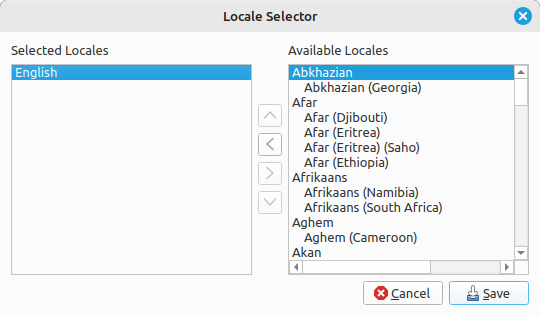
Zodra je tevreden met je selecties bent, klik je op de knop Opslaan om je selectie te bevestigen en het dialoogvenster te sluiten. Houd er rekening mee dat de wijzigingen pas worden opgeslagen als je op de knop Oké klikt.
Ignore name translation for these language scripts
Sometimes you may not want to have the items translated if they appear in a certain character set script. When checked, this option will tell Picard to not perform the translation if it is written using one of the selected scripts.
Each selected script includes a matching threshold value used to determine if that script should be used. When a name is evaluated to determine if it matches one of your selected scripts, it is first parsed to determine which scripts are represented in the name, and what weighted percentage of the name belongs to each script. Then each of your selected scripts are checked, and if the name contains characters belonging to the script and the percentage of script characters in the name meets or exceeds the match threshold specified for the script, then the name will not be translated.
For example, if “Artist names” is enabled with the locale set to “English”, and you enable “Ignore name translation for these language scripts” with the scripts set to “Greek (30%)” and “Cyrillic (50%)”, any artist names that contain 30% Greek characters or 50% Cyrillic characters will not be translated and will appear in their origin form.
Om de schriften en de bijbehorende drempelwaarden te selecteren, klik je naast de lijst met geselecteerde schriften op de knop Selecteren …. Er wordt dan een dialoogvenster geopend waarin je schriften kan toevoegen, bewerken, verwijderen of herschikken.
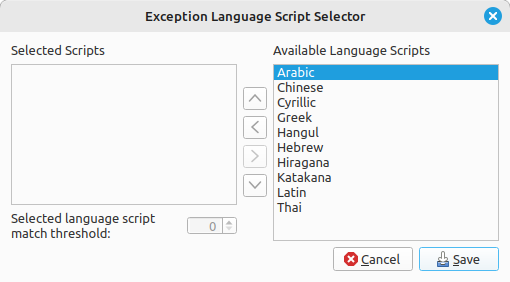
Zodra je tevreden met je selecties bent, klik je op de knop Opslaan om je selectie te bevestigen en het dialoogvenster te sluiten. Houd er rekening mee dat de wijzigingen pas worden opgeslagen als je op de knop Oké klikt.
Use artist sort name for translation
When this option is enabled, if there is no match for the selected locale for an artist, Picard can use the artist sort name (which is, by Style Guideline, stored in Latin script) as a fallback.
Diverse artiesten
Hier kan je instellen hoe de artiest ‘Diverse Artiesten’ in je tags wordt gespeld.
Losse opnamen
Hier kan je instellen hoe ‘losse opnamen’ moeten worden gegroepeerd.
Zie ook
Details: Uitgavevoorkeuren / Genres / Waarderingen