Matching
It is recommended for most users to leave these settings at their default values. For advanced users, these allow you to tune the way Picard matches your files and clusters to MusicBrainz releases and tracks.
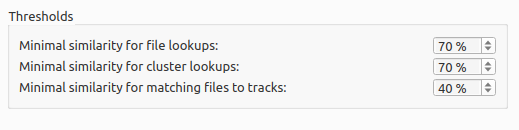
Minimum similarity
This setting determines the minimum match between a cluster and a release on MusicBrainz for the release to be considered and presented as a possible match. Matches below this threshhold will be ignored.
Minimum margin between best and second-best match
This setting determines the similarity difference to prefer one match over another. When Picard matches a file to tracks, it scores each candidate track by similarity. If the gap between the top two or more scores is less than this margin, the match is flagged as ambiguous, because the gap isn’t enough to be certain which one is the best. In this case, you must verify the track selection.
Minimal similarity for matching files to tracks
The higher the percentage value, the more similar an individual file’s metadata must be to the metadata from MusicBrainz for it to be matched to a track on a release in the Album pane.
This setting is used when a file is assigned to a release and Picard needs to decide which track to which it is assigned. This happens on cluster lookup after the release has been chosen, or if you manually drag files onto a loaded release (as opposed to dragging it onto a track directly). If none of the tracks gives a match above the threshold the file is moved into an “unmatched files” section on that release.
If you have absolutely no metadata in your current files, and you are using “Scan” to match tracks, you may find that you need to lower the value of “Minimal similarity for matching files to tracks” in order for Picard to match the files within a release. Otherwise you may find that Picard matches the track to a release but then is not sure which track is correct; and leaves it in an “unmatched files” group within that release.
Note
As a general rule, lowering the percentages may increase the chance of finding a match at the risk of false positives and incorrect matches.
Ignore track duration difference under this number of seconds
This specifies the number of seconds that a file can differ in length from the length in the MusicBrainz database and still be considered to be the same. The default value is 2 seconds.
Ignore the following tracks when determining whether a release is complete
Missing tracks of the selected type (i.e.: video, pregap, data or silence) will be ignored when determining whether a release is considered to be complete. For example, if “video” is selected then a release with a bonus video will be marked as complete if it has all the audio tracks matched with a file even if the video file is missing.
Tags to ignore for comparison
Tags in this list will not be considered when comparing the existing file metadata to the data retrieved from MusicBrainz. If the only difference between the file’s metadata and the metadata retrieved from MusicBrainz is a tag listed in this ignore list then the file will be considered unmodified.